How to Write a Check Amount in Words With Cents
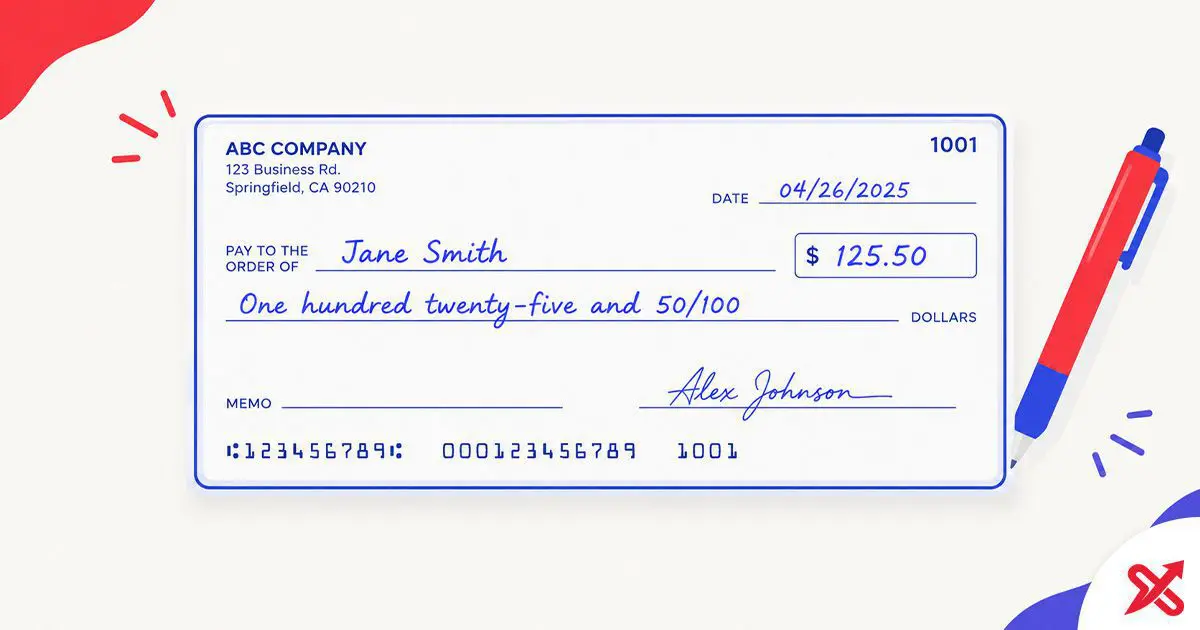
Here is how to write a check amount in words with cents: spell the whole dollars, write the word and, then write the cents as a fraction over 100. An amount of $125.50 becomes One Hundred Twenty-Five Dollars and 50/100 on the written amount line, and a round $100 becomes One Hundred Dollars and 00/100. On a typical US check, the written amount appears on the line below the payee's name, next to the printed word "Dollars".
A typical US check carries its amount in two places. The dollar box on the right holds the numerals, like $25.50, and the line under the payee holds the same sum in words. Keep the two fields identical so the check clears without questions. Type any sum into the Number to Words Converter and it prints the full written amount with the cents fraction, ready to copy onto the check.
Checks still fund rent, contractor work, school payments, and business invoices. The Federal Reserve counted 9.2 billion check payments in the United States in 2024, and a 2024 survey found one-third of US consumers had paid with a check in the previous 30 days. Payment figures cited here are based on 2024 data from the Federal Reserve. This post covers the amount line, the cents rule, the "and" placement, round amounts, the legal field, and the mistakes that get checks sent back.
💡 Key Takeaways
- Write the dollar amount in words, then the word 'and', then the cents as a fraction over 100, like Twenty-Five Dollars and 50/100.
- Use 'and' only before the cents; never inside the dollar amount, so it is One Hundred Five Dollars, not One Hundred and Five Dollars.
- If the words and numbers on a US check conflict, the words prevail under UCC § 3-114, so match both fields exactly.
How to Write the Amount in Words on a Check
Follow these six steps to fill the amount line correctly. Start with the dollar box so the numerals exist before you spell them.
- Write the amount in the dollar box as numerals, placed toward the left side with the cents shown: $25.50, never just 25.
- Spell the whole dollars on the amount line, largest group first: Twenty-Five for 25, or One Hundred Twenty-Five for 125.
- Write the word and directly after the whole dollars, exactly once.
- Add the cents as a fraction over 100, so 50 cents becomes 50/100 after the "and".
- Where space remains, draw a straight line from the end of the fraction across to the printed word "Dollars" so it is harder to add extra digits.
- Sign the check only after both amount fields are complete, and confirm the box and the words match before you hand it over.
The finished line reads Twenty-Five Dollars and 50/100. The Nebraska Department of Banking and Finance runs the same order in its How Do I Write a Check? guide: date, payee, numeral amount, written amount, memo, signature. The written field does double duty. It confirms the amount to the bank and makes tampering harder, because altering a spelled-out sum takes more effort than changing a digit in a number box.
How Do You Write Cents on a Check?
Writing a check amount in words means spelling the whole dollars, adding the word "and", then stating the cents as a fraction of a dollar. One cent is one hundredth of a dollar, so any cent count sits over 100: 5 cents is 05/100 or 5/100, 50 cents is 50/100, and 99 cents is 99/100.
The examples below follow common US check-writing conventions. Each row shows the same payment three ways.
| Amount | Dollar box (numerals) | Amount line (words) |
|---|---|---|
| $25.50 | 25.50 | Twenty-Five Dollars and 50/100 |
| $100.00 | 100.00 | One Hundred Dollars and 00/100 |
| $1,250.45 | 1,250.45 | One Thousand Two Hundred Fifty Dollars and 45/100 |
| $5,000.75 | 5,000.75 | Five Thousand Dollars and 75/100 |
| $10,000.05 | 10,000.05 | Ten Thousand Dollars and 05/100 |
| $75.09 | 75.09 | Seventy-Five Dollars and 09/100 |
Compound tens take a hyphen, so twenty-five, thirty-four, and sixty-seven keep the dash. Forty never takes a "u", even though its root four does. Cents under ten keep the leading zero in the fraction, so 5 cents reads 05/100 on the amount line.
A check for less than one dollar can be written with zero whole dollars followed by the cents fraction. For example, $0.43 reads Zero Dollars and 43/100.
Common Dollar Amounts in Words
Here are common dollar amounts in words:
| Amount | In words | On a US check |
|---|---|---|
| $1 | one dollar | One Dollar and 00/100 |
| $5 | five dollars | Five Dollars and 00/100 |
| $10 | ten dollars | Ten Dollars and 00/100 |
| $20 | twenty dollars | Twenty Dollars and 00/100 |
| $25 | twenty-five dollars | Twenty-Five Dollars and 00/100 |
| $50 | fifty dollars | Fifty Dollars and 00/100 |
| $100 | one hundred dollars | One Hundred Dollars and 00/100 |
| $500 | five hundred dollars | Five Hundred Dollars and 00/100 |
| $1,000 | one thousand dollars | One Thousand Dollars and 00/100 |
| $1,500.25 | one thousand five hundred dollars and twenty-five cents | One Thousand Five Hundred Dollars and 25/100 |
| $5,000.50 | five thousand dollars and fifty cents | Five Thousand Dollars and 50/100 |
| $10,000.99 | ten thousand dollars and ninety-nine cents | Ten Thousand Dollars and 99/100 |
Do You Write "and" Before Cents?
On a US check, the common format uses the word "and" immediately before the cents fraction, where it separates the whole dollars from the cents that follow. In One Thousand Two Hundred Thirty-Four Dollars and 56/100, "and" divides the dollars from the 56 cents. Using "and" inside the dollar amount is a common error, so "One Hundred and Five Dollars" should read "One Hundred Five Dollars", with the "and" moved before the cents: "One Hundred Five Dollars and 00/100". The cents always sit over 100 because one cent is one hundredth of a dollar, and US checks print the word "Dollars" at the end of the amount line so the fraction reads as written. Fifty cents is "and 50/100", and that fixed pattern is quick for a teller to read at a glance. Keep the "and" in this one spot and the line stays readable.
What Happens If the Words and Numbers on a Check Don't Match?
If the written amount and the numerical amount on a check conflict, words prevail over numbers under UCC § 3-114. That section of the Uniform Commercial Code provides a rule for resolving contradictory terms on negotiable instruments such as checks. It does not make the words a separate "legal amount": it resolves a disagreement between the two fields.
Keep the two fields identical, because a mismatch can send the check back for verification. Errors in the dollar box draw attention first, so an unclear number can delay payment even when the written line is correct. Fill both fields to the same sum and the contradiction rule never comes into play.
How to Turn Any Amount Into Check Words Online
A converter removes the grammar guesswork. Put 1,250.45 into the Number to Words Converter, pick US Dollar, and it prints the written amount with the cents fraction already formatted. Check the output against the rules in this guide before copying it onto the check.
Use the converter as the fast path, then verify the line: the "and" sits before the cents, and the cents sit over 100. When the output agrees with the steps above, copy the line and finish the check. For a round amount, keep the 00/100 form, which is the clearest on the amount line.
Avoid These Common Check Mistakes
These are common mistakes to check for before signing.
- Putting "and" inside the dollar amount. "One Hundred and Five Dollars" should read "One Hundred Five Dollars and 00/100", with the "and" before the cents only.
- Leaving the numerals flush against nothing. Place $25.50 toward the left side of the box so a digit cannot be added before the 2.
- Omitting cents on a whole-dollar check. Write "and 00/100" so nobody can insert a cent value later.
- Skipping the fill line. Blank space after 50/100 could let someone extend the amount, so draw a line to the word "Dollars".
- Writing cents as words out of habit. The fraction over 100 is the conventional way to show cents on a US check.
- Signing before the fields are done. A signed blank amount lets the holder set any figure; sign last.
- Fixing a mistake with white-out. A corrected amount can be refused or flagged, so write VOID across the check and start a fresh one.
One more point protects you after the check leaves your hand. Record the check number, payee, and date in your register, then compare the bank statement or returned check image with your records so a difference shows up early.
Frequently Asked Questions
How do I write cents on a check?
Write the dollar amount in words, then the word "and", then the cents as a fraction over 100, for example, Twenty-Five Dollars and 50/100.
Do I write cents as words or numbers on a check?
Cents are commonly written on the amount line as a fraction over 100, such as 50/100.
Do I write "and" before cents on a check?
Yes. In this common check-writing format, "and" separates the whole-dollar amount from the cents fraction, so $25.50 reads Twenty-Five Dollars and 50/100. Do not use it inside the dollar amount.
What happens if the words and numbers on a check don't match?
If the written amount and the numbers on a check conflict, words prevail over numbers under UCC § 3-114, so keep both fields identical.
How do I write a check with no cents?
Write the dollar amount in words followed by "and 00/100", for example, One Hundred Dollars and 00/100.
Do I need to fill the empty space on the amount line?
Yes. If space remains, draw a line through it so it is harder to add digits or words.
How do I convert a check amount to words online?
Type the amount into the SajiloX Number to Words Converter and copy the cheque line it prints, cents fraction included.
What does 00/100 mean on a check?
It states there are zero cents. The cents are a fraction of a dollar, and 00/100 means no cents.

SajiloX
SajiloX creates practical online tools and guides for everyday digital tasks. Our content includes step-by-step tutorials, useful comparisons, and clear explanations designed to help you complete tasks and make informed choices. We focus on accurate, practical information, with testing and verification included when applicable.


