Todoist vs TickTick (2026): Which Task Manager Wins?
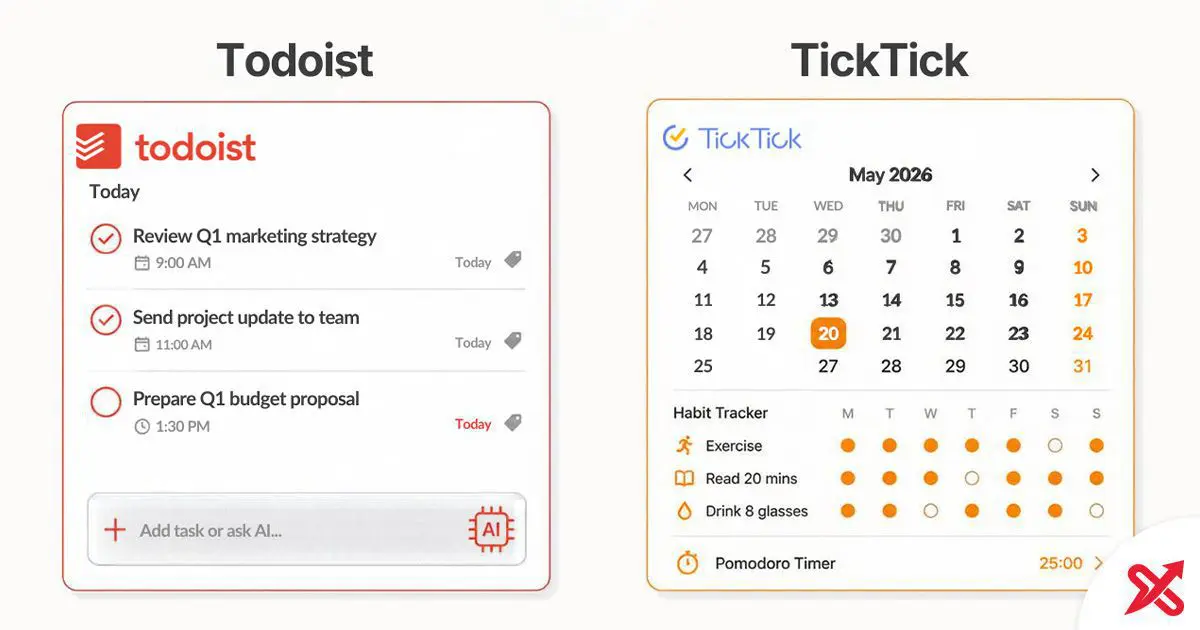
Todoist and TickTick are two established task-management apps, and they suit different habits. TickTick Premium costs $49.99 per year and bundles a calendar view, Pomodoro timer, and habit tracker into one app. Todoist Pro costs $60 per year and focuses on fast task capture with 90+ integrations. Pick TickTick for an all-in-one hub. Pick Todoist for a more task-focused tool.
💡 Key Takeaways
- TickTick Premium is cheaper than Todoist Pro and bundles calendar, Pomodoro, habits, and an Eisenhower matrix that Todoist lacks.
- Todoist wins on natural language input, integration count (90+), team/business plans, and SOC 2 Type II security compliance.
- Neither app is purpose-built for ADHD, but each serves different neurodivergent needs: TickTick for visual structure, Todoist for fast capture.
At a Glance
| Todoist | TickTick | |
|---|---|---|
| Paid price | $5/mo annual ($60/yr), $7/mo monthly | $49.99/yr annual (about $4.17/mo) |
| Free plan limits | 5 projects, task reminders, 1-week history | 9 lists, 99 tasks/list, 5 habits |
| Platforms | Web, Mac, Windows, Linux, iOS, Android, Apple Watch, Wear OS | Web, Mac, Windows, Linux, iOS, Android, Apple Watch |
| Standout feature | Natural language input, 90+ integrations, AI voice capture (Ramble) | Built-in calendar, Pomodoro timer, habit tracker, Eisenhower matrix |
| Team plan | Business at $8/user/mo annual | No dedicated business plan |
| Best for | Fast capture, GTD workflows, teams, integration-heavy stacks | All-in-one personal productivity, visual planners, budget-conscious users |
All prices verified against official Todoist and TickTick pricing pages. TickTick Premium is listed at $49.99/year; Todoist Pro at $60/year.
Pricing Compared (2026)
Todoist raised prices in December 2025, per its help documentation: Pro went from $4 to $5 per month on annual billing; Business went from $6 to $8 per user per month. TickTick currently lists Premium at $49.99/year. Current pricing is published on Todoist's pricing page and TickTick's upgrade page.
| Plan | Todoist | TickTick |
|---|---|---|
| Free | $0. Beginner: 5 projects, task reminders, 1-week history | $0. 9 lists, 99 tasks/list, 5 habits |
| Paid (annual) | $5/mo ($60/yr), Pro | $49.99/yr (about $4.17/mo), Premium |
| Paid (monthly) | $7/mo, Pro | Monthly option billed per month |
| Team/Business | $8/user/mo annual ($96/user/yr) | No dedicated business plan |
TickTick Premium costs about $10 less per year than Todoist Pro. The price difference matters more once you factor in what each plan includes: TickTick Premium bundles calendar views, habit tracking, Pomodoro, and up to 299 lists. Todoist Pro adds reminders, calendar layout, and AI features. Both free plans handle light personal use, though Todoist caps you at 5 projects while TickTick caps you at 9 lists.
Features Compared Head-to-Head
| Feature | Todoist | TickTick | Winner |
|---|---|---|---|
| Natural language input | Yes | Yes | Todoist |
| Recurring tasks | Yes | Yes | Tie |
| Subtasks | Yes | Yes | Tie |
| Priority levels | 4 | 5 | TickTick |
| Habit tracking | No | Yes | TickTick |
| Pomodoro timer | No | Yes | TickTick |
| Built-in calendar view | Project calendar layout | Multiple calendar views + time scheduling | TickTick |
| Eisenhower matrix | No | Yes | TickTick |
| White noise for focus | No | Yes | TickTick |
| Integration ecosystem | 90+ (published total) | No published total | Todoist |
| AI features | Named Assist set (Task Assist, Email, Filter, Ramble) | Listed on Premium; smaller named set | Todoist |
| Team workspaces | Team projects, roles, permissions, centralized billing | Shared lists and task assignment | Todoist |
| Linux desktop app | Yes | Yes | Tie |
| Offline mode | Yes | Yes | Tie |
| Security compliance (SOC 2 Type II) | Yes | Security page; check current certifications | Todoist |
| Free plan generosity | Limited (5 projects) | Generous (9 lists) | TickTick |
| Annual price | $60 | $49.99 | TickTick |
| Best value for budget | No | Yes | TickTick |
Feature statuses verified against official Todoist and TickTick feature pages, plus the TickTick help center. Todoist lists 90+ integrations on its pricing page and states SOC 2 Type II compliance. TickTick's integration count is not published as a total on its official site, so it is described as a smaller native set. Both apps now offer Linux desktop support.
Core Task Management
Both apps handle the basics well: tasks with due dates, priorities, subtasks, recurring schedules, and multiple views (list, board/kanban). The differences show up in how fast you can get tasks into the app and how you organize them.
Natural language input
Todoist parses phrases like "Call dentist next Thursday at 2 pm p1" and sets the date, time, and priority from one line of text. This is one of its strongest advantages for fast task capture. TickTick also supports natural-language input and recognizes dates and times as you type, though Todoist advertises a more extensive set of quick-add keywords. Todoist's input speed removes friction where most task apps lose people.
Recurring tasks
Both apps support recurring schedules. Todoist distinguishes "every" (fixed calendar dates) from "every!" (resets from completion date), which matters for rolling habits. TickTick handles recurring schedules with similar flexibility, and Premium adds checklist reminders for subtask-level recurrence.
Organization structure
Todoist uses projects, sections, and tasks, with labels and filters for cross-cutting views. TickTick uses lists and tasks, with tags and smart lists for filtering. Todoist's filter system handles complex views like "all high-priority tasks due this week across three projects." TickTick's smart lists are simpler but cover most personal-use cases.
Priority levels
Todoist gives you four priority levels. TickTick offers five priority levels plus the Eisenhower matrix, per its feature documentation and widely reported specs. For tasks that need fine-grained importance, TickTick offers more control. For many users, the difference between four and five priority levels may not matter.
What TickTick Bundles That Todoist Doesn't
TickTick's core pitch is that one app replaces three or four separate tools. Premium includes:
- Calendar view: Day, week, month, and list views with drag-and-drop task scheduling. Shows tasks alongside external calendar events from Google Calendar or Outlook.
- Pomodoro timer: Built-in focus timer that logs session time against tasks. Premium adds focus statistics showing productive hours by day, week, and month.
- Habit tracker: Daily, weekly, and custom-frequency habits with streak counting and completion analytics. Free plan allows 5 habits; Premium allows 299.
- Eisenhower matrix: Priority matrix view for sorting tasks by urgency and importance.
Todoist does not bundle a habit tracker, Pomodoro timer, or Eisenhower matrix the way TickTick does. Its calendar layout is more limited than TickTick's full calendar views. Users who want Pomodoro or habit tracking must use separate apps or third-party integrations. For people who prefer one app for everything, TickTick's bundle is the stronger value proposition.
Where Todoist Pulls Ahead
- Integrations: Todoist lists 90+ integrations on its pricing page, including Google Calendar, Slack, Zapier, IFTTT, Alexa, Google Assistant, and email forwarding. TickTick has a smaller native integration ecosystem.
- AI features: Todoist offers a named Assist feature set: Task Assist (AI task breakdown), Ramble (voice-to-task), Email Assist, and Filter Assist. TickTick also lists AI features on its Premium plan but does not document as broad a named set as Todoist. Availability of some Assist features can vary by plan and rollout.
- Natural language speed: Todoist's natural-language input is one of its strongest advantages for fast task capture with date, time, priority, and project in a single line.
- Team and business use: Todoist Business adds shared workspaces, team projects, role-based permissions, and centralized billing. TickTick has no dedicated business plan comparable to Todoist Business.
- API access: Todoist maintains a public API with SDKs and developer documentation. TickTick also offers an API, but Todoist's developer ecosystem is more extensive.
- Security compliance: Todoist states it is SOC 2 Type II compliant and GDPR compliant. TickTick publishes a security page, and its certifications, if any, should be confirmed on the current security page.
Both apps work offline, keep a browser extension, and refresh reliably across devices. Where they split is depth: Todoist goes deep on connections and teams, TickTick goes wide on built-in tools.
Todoist vs TickTick for ADHD
This section discusses task management features through a neurodivergent lens. It does not provide medical advice. ADHD affects people differently, and the right tool depends on your specific workflow needs.
Neither Todoist nor TickTick was designed specifically for ADHD. Both are general-purpose task managers. But certain features in each app can help people with ADHD manage challenges like time management, task initiation, working-memory demands, and maintaining routines.
What ADHD users may need from a task app
Low-friction capture so thoughts don't vanish, visible time so the day has shape, small daily views instead of an overwhelming wall of overdue tasks, and reminders that fire reliably. For many ADHD users, the app that works best is the one they stick with after the initial novelty passes.
Where TickTick helps
- Pomodoro timer: Built-in focus sessions let you start a timer from within a task, removing a separate app-switch step.
- Habit tracker: Streaks and completion percentages provide visible progress feedback that can reinforce consistency.
- Calendar view: Seeing tasks mapped onto time blocks can help with time perception. You can drag a task to a specific hour instead of hoping you remember it later.
- Color-coded priorities: Visual priority levels make it easy to spot what matters today without reading every task title.
Where Todoist helps
- Fast capture: Natural language input lets you dump a thought into Todoist quickly. For users who lose ideas between thinking of them and typing them, speed matters more than any other feature.
- Clean interface: Fewer visual elements reduce overwhelm for users who get distracted by too many buttons, menus, and views.
- Recurring "every!" schedule: The completion-reset recurrence means habits show up when you complete them, not on a fixed calendar date that creates guilt when missed.
- Karma system: Completing tasks earns points and maintains streaks. For users who respond to gamified feedback, this offers visible reinforcement.
Where both fall short
Neither app is primarily an automatic schedule optimizer in the same category as dedicated auto-scheduling tools. Neither breaks large projects into subtasks automatically (Task Assist helps, but it is not automatic). If you want those capabilities, tools like Motion, Sunsama, or Structured fill the gap. This comparison covers Todoist and TickTick head-to-head; the broader ADHD productivity space has options worth exploring if neither app fits.
Is TickTick a Chinese App? Is It Safe?
TickTick is provided by Appest, the company named as the provider in TickTick's Terms of Service. TickTick's own about page says the product began as GTasks, an Android app synced with Google Tasks, and that the team later launched TickTick and has grown it for more than a decade. Its security page states user data is stored and encrypted on AWS servers in the United States.
The "Chinese app" question stems from TickTick's origin and from the related product "Dida," which is the version marketed to users in mainland China. The global TickTick product is a separate application from Dida. If data jurisdiction matters to you, review TickTick's current privacy policy and Terms of Service before deciding. Privacy policies change, and the details of data handling, ownership, and company registration are worth reading firsthand rather than relying on any summary, including this one.
For comparison, Todoist is made by Doist, a remote-first company with headquarters in Porto, Portugal. Doist states it is GDPR compliant and SOC 2 Type II compliant. If regulatory compliance and data residency are your top priorities, Todoist provides more publicly verifiable certifications.
Who Should Choose What
Choose Todoist if you:
- Capture tasks fast and want the quickest input method available
- Use many third-party tools and need strong integrations
- Work with a team and need shared projects, permissions, and centralized billing
- Prefer a clean, focused app that does one thing well
- Value documented security and privacy compliance, including SOC 2 Type II and GDPR
- Want a large integration ecosystem and deep API access
Choose TickTick if you:
- Want one app for tasks, calendar, habits, and focus timing
- Are budget-conscious and want more features per dollar
- Think in time blocks rather than lists
- Use the Pomodoro technique or want to start
- Track habits alongside tasks and prefer not to juggle multiple apps
- Need a strong free plan for personal use
Common Scenarios
You just want a task list that works. Todoist keeps the interface task-focused. No built-in habit tracker or Pomodoro timer, and a cleaner layout for list work. If past all-in-one apps overwhelmed you, this is the pick.
You are tired of paying for four separate apps. TickTick bundles tasks, habits, Pomodoro, and calendar into one subscription. You keep what you need and cancel the rest.
Your team shares projects. Todoist workspaces handle comments, assignments, and permissions, with team-oriented plans. TickTick supports shared lists and task assignment, but Todoist offers a more developed team workspace.
You plan your day visually. TickTick maps tasks onto time blocks so you see your day, not just your list. Todoist lists upcoming work but does not plan it visually.
You live in Slack, Gmail, and Google Calendar. Todoist lists 90+ integrations that connect to the tools you already use. TickTick has a smaller native set.
You are on a tight budget. TickTick Premium at $49.99 a year bundles more features than Todoist Pro at $60. The math favors TickTick.
What Should You Pick?
Both Todoist and TickTick are strong task managers. TickTick wins on value: you get calendar, Pomodoro, habits, and tasks in one app for less money. Todoist wins on speed and ecosystem: natural language input, 90+ integrations, and team features. Pick TickTick if you want an all-in-one personal productivity hub. Pick Todoist if you want fast capture, strong integrations, or a team-ready tool.
Frequently Asked Questions
Is TickTick a Chinese app?
TickTick is provided by Appest, the company named as the provider in TickTick's Terms of Service. The global TickTick app is separate from "Dida," the version for the Chinese market. Global user data is stored on AWS servers in the United States.
Who owns TickTick?
TickTick is provided by Appest, the company named as the provider in TickTick's Terms of Service. TickTick's About page says it began as GTasks and that the team later launched TickTick.
Is TickTick safe to use?
TickTick states that user data is stored on AWS servers in the United States and encrypted at rest, with automatic backups. The company publishes a security page and privacy policy. Review the current privacy policy for the latest details.
Is Todoist or TickTick better for ADHD?
Neither is purpose-built for ADHD. TickTick suits people who need visual structure through its Pomodoro timer, habit tracker, and color-coded priorities. Todoist suits people who abandon apps that take too many taps, because its natural-language input is a strong advantage for fast capture.
Which is cheaper, Todoist or TickTick?
TickTick Premium costs $49.99 per year at the current list price. Todoist Pro costs $60 per year on annual billing. TickTick is about $10 a year cheaper and includes more built-in features.
Can I switch from Todoist to TickTick without losing data?
Both apps support CSV import and export in their web apps, but migration has some limitations. Export your Todoist tasks as a CSV file and import them into TickTick. Recurring task rules and some formatting may need manual adjustment after import.
What are the disadvantages of Todoist?
The free plan limits you to 5 projects. Custom reminders and calendar view require Pro. There is no built-in habit tracker or Pomodoro timer. Pro costs more than most competing task managers.
Is Todoist worth paying for?
Todoist Pro pays for itself if you manage more than 5 projects, need custom reminders, use the calendar view regularly, or rely on AI features like Ramble voice capture. For simple personal task lists, the free plan covers your needs.

SajiloX
SajiloX creates practical online tools and guides for everyday digital tasks. Our content includes step-by-step tutorials, useful comparisons, and clear explanations designed to help you complete tasks and make informed choices. We focus on accurate, practical information, with testing and verification included when applicable.


